beautyfire
Let shoppers see a wig on their own photo
Beautyfire Try-On adds a "Try it on" button to your wig product pages. Shoppers upload a selfie and see the wig on themselves in seconds, without leaving your store. They can switch between wigs, save their favourite looks and download them.
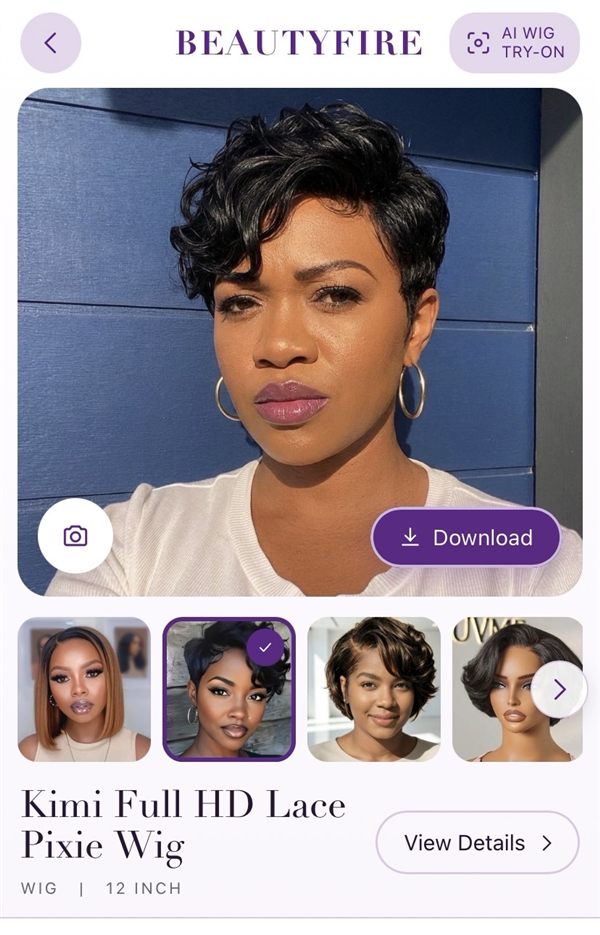
What your shoppers will see
Real try-ons made with the app. Each look starts from the wig's main product photo in your store.
Kimi Full HD Lace Pixie Wig


Lora HD Lace Glueless Wig


Pin-curl updo wig


How it works
- Your wigs, your photos. Each look uses the product's own main photo from your store.
- Pay for what shoppers use. Start free, or pick a plan with more looks included. Everything is billed by Shopify on your normal Shopify bill, with daily limits and a cap on extra looks that you set.
- Private by design. Shoppers' photos are deleted as soon as each look is ready. Read the privacy policy.
Pricing
Start free and move up as your shoppers try on more wigs. Every plan includes a set number of looks each month; after that, extra looks cost less on bigger plans. Everything is billed by Shopify.
Free
$0/month
- 20 looks a month included
- $0.15 per extra look
- Unlimited wigs and shoppers
- AI try-on on every wig's product page
- Works with any Online Store 2.0 theme, no code
- Supplier and dropshipped wig photos work as they are
- Daily limits per shopper and a cap on extra looks
- 1-on-1 support
- Lifetime support for as long as you use the app
- Help with wig dropshipping
Starter
$19/month
- 265 looks a month included
- $0.15 per extra look
- Unlimited wigs and shoppers
- AI try-on on every wig's product page
- Works with any Online Store 2.0 theme, no code
- Supplier and dropshipped wig photos work as they are
- Daily limits per shopper and a cap on extra looks
- 1-on-1 support
- Lifetime support for as long as you use the app
- Help with wig dropshipping
Growth
$49/month
- 710 looks a month included
- $0.10 per extra look
- Unlimited wigs and shoppers
- AI try-on on every wig's product page
- Works with any Online Store 2.0 theme, no code
- Supplier and dropshipped wig photos work as they are
- Daily limits per shopper and a cap on extra looks
- 1-on-1 support
- Lifetime support for as long as you use the app
- Help with wig dropshipping
Pro
$99/month
- 1,900 looks a month included
- $0.08 per extra look
- Unlimited wigs and shoppers
- AI try-on on every wig's product page
- Works with any Online Store 2.0 theme, no code
- Supplier and dropshipped wig photos work as they are
- Daily limits per shopper and a cap on extra looks
- 1-on-1 support
- Lifetime support for as long as you use the app
- Help with wig dropshipping
Scale
$299/month
- 6,800 looks a month included
- $0.06 per extra look
- Unlimited wigs and shoppers
- AI try-on on every wig's product page
- Works with any Online Store 2.0 theme, no code
- Supplier and dropshipped wig photos work as they are
- Daily limits per shopper and a cap on extra looks
- 1-on-1 support
- Lifetime support for as long as you use the app
- Help with wig dropshipping
A look is one AI try-on of a wig on a shopper's photo. Looks a shopper already made in a visit open again for free, and shoppers never pay anything. How looks are billed.
Set up in about 5 minutes
Everything happens in your Shopify admin, before shoppers see anything in your store. There's no other account to create.
-
Choose a plan
When you install the app, Shopify shows the plans. Pick Free to try it, or a plan with more looks. You can change plans at any time from the app's Set up page.
-
Choose your wigs
If your store has a collection called Wigs, the app uses it automatically. Otherwise pick the collection that holds your wigs, so shampoos and brushes never appear in the try-on.
-
Turn on the Try it on button
On the Set up page, click Turn on try-on, then Add button to product page. Each opens your theme editor at the right spot; click Save there. It works with any Online Store 2.0 theme, without editing code.
Get started
Install Beautyfire Try-On from the Shopify App Store, choose a plan, then follow the two setup steps in the app. Already installed? Open it from Apps in your Shopify admin.